Can't find the server error (Webdesign Fixed)

3:10:00 PM |
There are many errors that will happen when you design a website then bring it live. The error that I got today is "Can't find the server". 


I just moved www.startGBC.com website from Wordpress.com to Godaddy. I worked fine at the first time. Then that error appears. After struggling to find a solution for this. I found that I redirect from non-www to www website which is the reason why dns nameserver doesn't recognize. 

The solution is very simple. All you need is to add an alias to the non-www. 

It works great now!
Read more…

Why and how to segment your Email list (Mailchimp)

11:20:00 AM |
You may don't know that 77% of consumers prefer to receive permission-based marketing communications through email (stats from ExactTarget). In addition, segmenting your email marketing list is also a most important step to reduce the unsubscribe rate and improve the open rate.


Why? It's obvious that you want to send the right thing to the right people. They'll think that you are communicating with them, not someone else. When they think like that, it's more likely that they will open your emails.

When? It's also a tricky question though. I think that when you have enough resource to mange your email marketing campaign, and your list is big enough to do this (>1,000 in my opinion).

What? You may want to segment your customer list based on few conditions that you want for example:

  • Gender
  • Age
  • Location
  • Purchase habit
  • Interest
  • Birthday
  • ...

How? There are many methods to do this; however, it's better if you know what information you need to collect your email marketing list at the beginning. If you don't, there are many ways that help to collect more information of your current email marketing list:

  • Send an email and ask them directly
  • Conduct a survey or contest
  • Integrate with another platform such as, Google Analytic,  social media or eCommerce sites 
  • ...
After you have all information needed, you can start segmenting your email marketing list. I used Mailchimp to manage all the email list. It's easy to do. If you need a demonstration video, please let a comment.

Have a nice day :)
Read more…

Table cellpadding not working in Wordpress (solved)

3:29:00 PM |
When you try to modify a table in Wordpress, it doesn't seems working at all. It's because you cannot override the theme configuration by using simple formulas such as cellpadding or cellspacing.


What you need to do is to try to change in very single cell in the table. For example:

<table><tbody>
<tr>
<td style="padding: 10px;"></td>
</tr>
</tbody></table>

Have fun!
Read more…

How to hide featured image in Single Post in Wordpress

11:41:00 AM |
After hide featured image in Wordpress (from startGBC.com)
I don't know what happened to the recently Wordpress update, but I really hate the way that my featured image being added to inside the post. So what I do is simply to remove featured image on posts.

Step 1: open your style.css or custom css in your theme

Step 2: insert this miracle line:
.single .featured-image { display: none; }
Have fun!
Read more…

How to Get More Views on Youtube

11:05:00 PM |
There is many way that we can get more views on YouTube. The picture below shows my strategy for implementing YouTube into the social media ecosystem.


The more you share, the more views you get. I also applied Facebook Advertise by using YouTube video. In addition, traffic tracking is also an important part in this strategy because you won't know what works and what doesn't.

Some tools that I use for tracking: bit.ly and Google Analytics.
Read more…

How UnMarketing Changed my Mindset about Relationship Marketing

7:41:00 PM |
Although I'm a marketing student, but I used to think that Relationship Marketing is something that really hard to achieve while doing business. However, UnMarketing has blowed my mind not because what Scott Stratten and Alison Kramer wrote in their books. It is because what they did made people like me feel special. Indeed, Scott Stratten and Alison Kramer did make my heart skip a beat. It is an unique experience in my entire life until now.

unmarketing

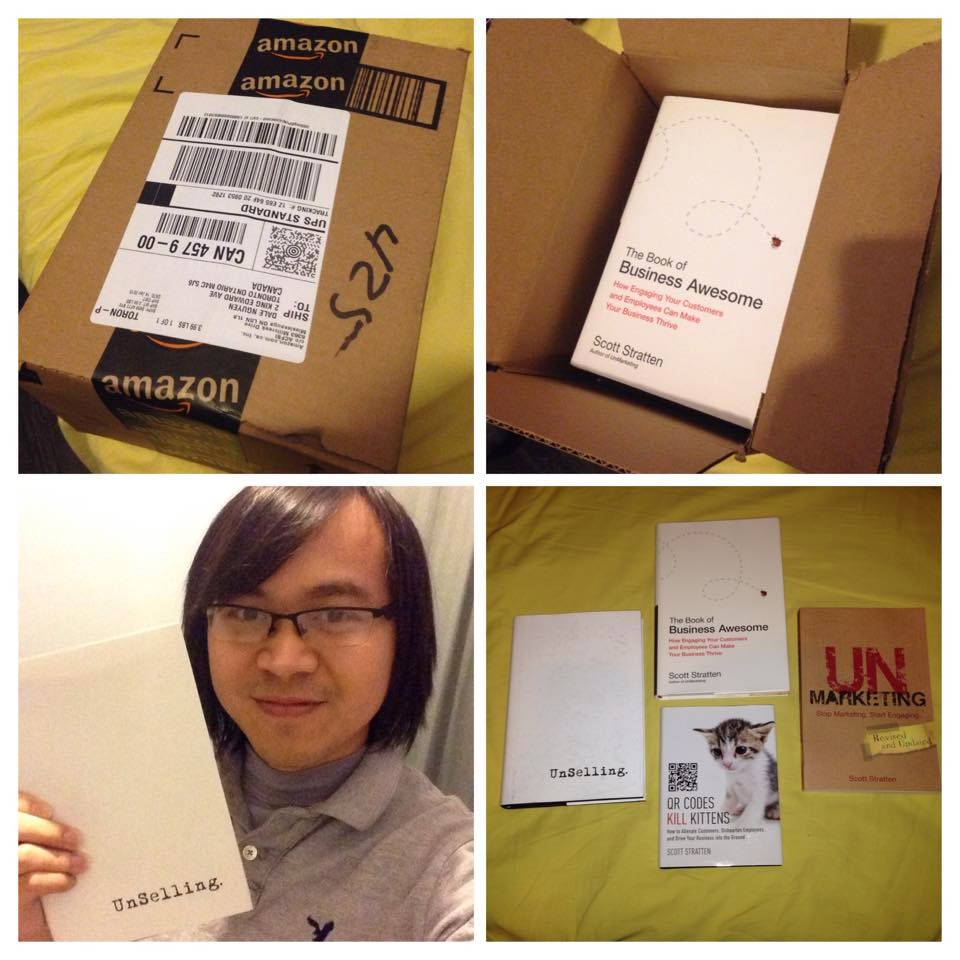
Here is the story of "The Santa did come to the town".

Before Christmas, I posted a single status telling that all I need is the book Unselling, and I didn't expect that will come true.

A photo posted by Dale Nguyen (@dale.nguyen) on

Nothing happened, and I almost forgot about it until one day. An Instagram user @unmarketing made a comment ask me if I received the Christmas gift yet or not, then told that "Go to the contact form at unMarketing.com and send your address. We'll get you a copy".

Because it is no harm, so I did and hope that the miracle will come (still don't believe that gonna happen). 

Until today, Jan 15, 2015. I got a package from Amazon.

unmarketing

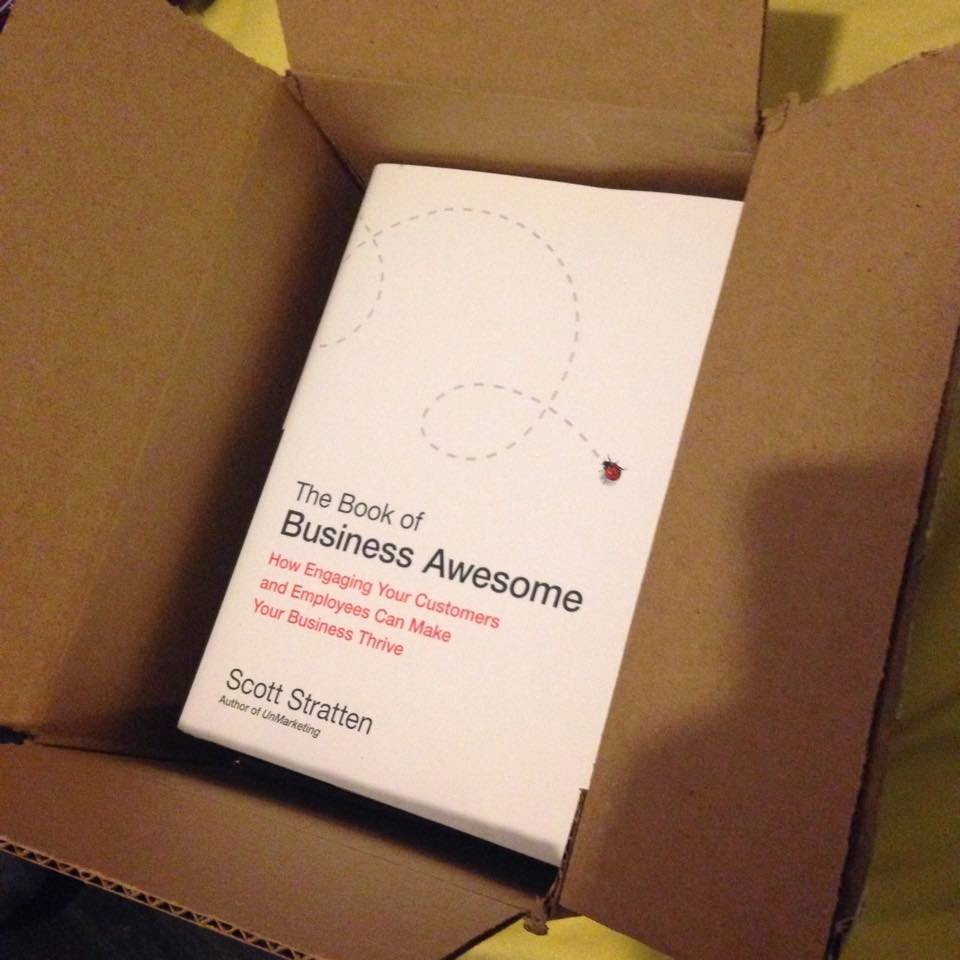
I did not remember what I ordered from Amazon, but It has my name on it. so I opened it.

Scott Stratten

OMG, It's Scott Stratten! I don't know that you put the book Business Awesome in the front on purpose or not, but it's really AWESOMEEEEE.


My heart did skip a beat! I wished only one book - the UnSelling. Now got 4 of your books, and it's beyond my imagination. You guys always know how to Surprise and Delight Your Customers. I have to admit that.


It is a wonder late Christmas gift ever. Thank Scott Stratten and Alison Kramer so much. You already got my loyalty!
Read more…

Presenting Remotely from the iPhone or Smart Devices

9:11:00 PM |
I always want to find a way to present a Powerpoint or Prezi from my iPhone without paying anything. Like, how to present Prezi from iPhone for free. 


Option 1: if you only need to present remotely, just use a remote control.

Option 2: don't have remote control, don't worry. You can always turn a wireless mouse to control the presentation from far away. The problem is it will be fine if you control a Powerpoint remotely with a wireless mouse.

However, you can only control a Prezi presentation with a left or right arrow on your keyboard. So, the solution is to add left and right function to your mouse. You can do that by using this special software called X-Mouse Control. By using this app, you can always turn your middle wheel on your mouse to left and right, or left click and right click to left and right arrow - just for short time, so you can control your Prezi remotely. 

Option 3: don't want to use a remote mouse? Fine! Let's use your iPhone or a smart device to a remote control. Kool?

What you need?

- Computer (which will connect to projector) and iPhone with Internet. 
- Teamviewer

Get it? Use your iPhone to control your computer by using Teamviewer! From the moment you connect to the computer with your phone. You can control anything. You can start to present a Powerpoint presentation or a Prezi presentation with your iPhone. However, be careful with the internet connection.  
Read more…

How to Backup Gmail Emails

8:29:00 PM |
I write this post because I want to show you how to backup your Gmail emails to your computer. It can also help to transfer all of Gmail emails to another Gmail account.

Step 1: download Gmail Backup program from Google Code

Step 2: Install the Gmail Backup program to your computer and run it

Step 3: fill your email account and password then press backup button

How to Backup Gmail Emails

After that, just wait until it finishes. When you want to restore your emails, fill your account username and password then press restore button.

Trouble shooting: If you receive those alerts such as:  "Error: IMAP: [ALERT] Please log in via your web browser: http://support.google.com/mail/accounts/bin/answer.py?answer=78754 (Failure)", you should try the following methods:

+ try to login via your web browser then login to your Gmail backup again
+ go to less secure apps and enable this function, so your Gmail backup app can connect to your account

Have fun :)
Read more…

How to Remove Hostiger Ads on 000webhost

5:18:00 PM |
If you created a free account at 000webhost, you may get Hostinger pop up Ads when accessing your website. Luckily I searched and figured out how to remove Hostiger Ads on 000webhost. Here is how you do it. 

Step 1: go to this website: members.000webhost.com/analytics.php

Step 2: type your domain name and password -> Disable Code -> Submit


Congratulation! There will be no pop up ads on your website.

Or just move to Hostgator as Hosting Service with real customer support :)

Read more…

Hardcore SEO - Podcamp 2014

10:41:00 AM |

After a brief but fascinating introduction by myself, Rob Campbell, participants will be assigned tasks online that will culminate in this Podcamp Session description page reaching top of page one of Google for the search term 'hardcore seo'. It doesn't matter what's there now; I haven't even looked... Oh yes I'm sure the competition is quite stiff. It doesnt matter - this 2014 Hardcore SEO Session Page will push everything aside like a snow plow as it climbs to the top of the page... all because of what we are going to do together during the session. Be there.
Read more…

How to Migrate from Blogger to WordPress

4:41:00 PM |
In this post I'll show you how to migrate your blog from Blogger to WordPress site. All that you need to do is to follow some simple steps:

Step 1: Login to your Dashboard -> Tools -> Import


Step 2: choose Blogger to import from Blogger


Step 3: Install Blogger importer


Step 4: Active and Run Importer


Step 5: Login to your Blogger account


Step 6: Allow access and start to import


After migrate your blog from Blogger to WordPress, you can edit category so it can appear correctly on your WordPress site.
Read more…

How to Back Up and Restore Your WordPress Website

3:47:00 PM |
After having your WordPress installed on your hosting. The first thing you should do is to backup your website. There are many methods that can help you to backup your files and database easily. However, in this post, I'll show you how to use BackupWordPress plugin to backup your WordPress website:


I. How to Backup Your WordPress Website

Step 1: Go to your Plugin tab and search for BackupWordPress plugin then install and active it.

Step 2: Go to Tools -> Backups


Step 3: Schedule your backup


After finishing backup your website, there's an email that will alert you about this. You can download the backup to your computer if you want.

II. How to Restore Your WordPress Website

Step 1: backup your files

The backup site files consist of three folders called wp-admin, wp-content and wp-includes plus a number of php files and a .htaccess file. You will need to upload the site files to your site and overwrite the existing files. This can be done via FTP using the file manager provided by your hosting company panel or via an FTP or SFTP client (such as Filezilla for PCs or Transmit for Mac). Make sure you choose to replace the existing files with the new ones. If you are restoring your site after a hack or virus attack it is better to delete all the site files prior to uploading the new files in case additional files have been added.

Step 2: backup your database. This should automatically overwrite the old tables. There are a number of different ways that this can be done:

  • Using a tool such as phpMyAdmin. This and similar tools are usually available via your hosting company panel.
  • Using a desktop tool.
  • MySQL commands via the command line prompt.
  • For more information see WordPress codex article on restoring your database from backup.
Read more…

How to Install SugarCRM Community Edition (GoDaddy)

8:31:00 PM |
It is really struggling to install SugarCRM Community Edition on GoDaddy hosting. It finally works after the third time trying. However, after that I got the problem with Email setting "Inbound Email cannot function without the IMAP c-client libraries enabled/compiled". The only thing they tell me is to give up SugarCRM or change your hosting service. But wait! I'll show you the solution for this problem. 


I. How To Install SugarCRM Community Edition (GoDaddy)

Step 1: Download SugarCRM to your computer. If you use another hosting service, you can install directly from the application management. 

Step 2: Unzip and upload to your host using FTP client such as FileZilla (E.g. http://yourhosting/sugarcrm)

Step 3: Change the permission to 755. The files and directories that must be writable by your web server are:

  • config.php
  • config_override.php - does not exist by default but is created when modifying System Settings
  • sugarcrm.log
  • cache/ and all subdirectories and files
  • custom/ and all subdirectories and files
  • data/ and all subdirectories and files
  • modules/ and all subdirectories and files

Step 4: Go to your Cpanel and create a MySQL account.

Step 5: Start to install SugarCRM by entering: http://yourhosting/sugarcrm and follow the instruciton.

II. Troubleshooting (GoDaddy)

1. If you can't see any image or get structure errors, reupload the error file and check the permission. (Eg. ..\sugarcrm\include\MVC\View\SugarView.php)

2. The most popular error is the IMAP c-client libraries. In order to solve this problem, you have to edit the config_override.php file by adding this line "$sugar_config['allow_pop_inbound'] = true;", so you can use the POP3 instead of IMAP.

BonusHow to Set Up a Simple Email Campaign - SugarCRM

Have fun!
Read more…

How to Rip a DVD Using VLC Media Player

3:13:00 PM |
This is how you gonna Rip a DVD Using VLC Media Player. It's very simple. What you need is to follow some simple steps:

Step 1: Open your VLC player and choose Conver/Save...


Step 2: You can rip file or disc by choosing the appropriate Tile & Chapter that you want to rip


Step 3: Name the destination file and have fun!

Read more…

Fixing Mod_rewrite and .htaccess on GoDaddy Hosting

7:22:00 AM |
For those who are struggling with Mod_rewrite on GoDaddy hosting. There are many problems with this one. I want to use url redirect function by editing the .htaccess file. It works only the first time, however after that the .htaccess file changes back to the original without any changes. 

After searching and digging with Mod_rewrite and .htaccess file. I finally come to a solution:


I added the following line:

Options +FollowSymlinks -Multiviews

And the redirect line.

Notes: If there's no change with url redirect. You can edit the permission of the .htaccess file Read and Execute only.

Read more…

How to change your Favicon on Wordpress

7:21:00 PM |
If you want to change your default favicon, this is the right place. In this post, I'll show you how to change / add your favicon on your WordPress website. 

A favicon is typically a graphic 16 x 16 pixels square and is saved as favicon.ico in the root directory of your server. You can use a favicon with any WordPress blog on a web server that allows access to the root directories.

Step 1: Go to your theme editor and select header or header.php


Step 2: Search for the line of code that contains favicon. Overwrite it, if it exists, or add the following code below the <head> HTML tag then save it.

<link rel="shortcut icon" href="<?php echo get_stylesheet_directory_uri(); ?>/favicon.ico" />

Step 3: upload your favicon.ico to your WordPress folder using either file manager or ftp client. Then check again by entering http://yourwebsitename.com/favicon.ico

Step 4: Refresh your blog and the miracle will happen


Note: delete your browser's cache if you see no change.
Read more…

How to Install Disqus on WordPress

10:33:00 PM |
Disqus is a blog comment hosting service for websites and online communities that uses a networked platform. I will show you how to install Disqus on WordPress easily. 

Step 1. Set up your account on Disqus website. 


Step 2: install Disqus Comment System plugin on WordPress.


Step 3: Refresh your website and start commenting.


Read more…

How to Link an AdSense account to an Analytics account

10:07:00 PM |
In this post, I'll show you how to link an AdSense account to an Analytics account by following simple steps. 

Step 1: sign in your Google AdSense account > Setting  > Access and authorization


Step 2: Sign in your Google Analytics account. If you don't have, create one.


Step 3: Copy tracking code to your site


Step 4: Link your accounts


Step 5: Check your AdSense account and congratulation!


Read more…

Fixed: PHP Warning - POST Content Length exceeds the limit

9:16:00 PM |
When upload a theme to my WordPress hosting, I get this error: "PHP Warning: POST Content-Length of xxx bytes exceeds the limit of 8388608 bytes in Unknown on line 0". This is because you exceeded the limit of uploading files. 


In order to solve this problem, you have to edit the php.ini file in your hosting.

You have find post_max_size and upload_max_filesize, then change the default number to 30M or what ever you want.


After changing your file, restart your web server (for local hosting) or try to upload your file again.
Read more…

How to Add Floating Social Share Buttons Widget to Blogger

12:26:00 AM |
This is a very simple method to add floating social share buttons widget to Blogger. I hope that you find the right way when reading this blog. By adding sharing buttons, it can help to improve your SEO and traffic to your blog. 


What you need to do is to follow these steps:

Step 1. Go to Layout

Step 2. Click on Add A Gadget link

Step 3. From the pop-up window, scroll down and select HTML/Javascript

Step 4. Copy the code below and paste it inside the empty box

Step 5. Save the gadget.
<!-- Add This by www.itbox4vn.com--><style type="text/css"> #pageshare {position:fixed; bottom:5%; margin-left:-721px; float:left; border-radius:5px;-moz-border-radius:5px;-webkit-border-radius:5px;background-color:#fff;padding:0 0 2px 0;z-index:10;} #pageshare .sbutton {float:left;clear:both;margin:5px 5px 0 5px;} .fb_share_count_top {width:48px !important;} .fb_share_count_top, .fb_share_count_inner {-moz-border-radius:3px;-webkit-border-radius:3px;} .FBConnectButton_Small, .FBConnectButton_RTL_Small {width:49px !important; -moz-border-radius:3px;/*bs-fsmsb*/-webkit-border-radius:3px;} .FBConnectButton_Small .FBConnectButton_Text {padding:2px 2px 3px !important;-moz-border-radius:3px;-webkit-border-radius:3px;font-size:8px;} </style> <div id='pageshare'> <div style="margin-left:8px;"><div class='sbutton' id='like' style='margin: 5px 0 0 5px;'><script src='http://connect.facebook.net/en_US/all.js#xfbml=1'> </script>
<fb:like layout='box_count' show_faces='false'></fb:like> </div></div><br /><div class='sbutton'><a class='twitter-share-button' data-count='vertical' data-via='itbox4vn' expr:data-counturl='data:blog.url' href='http://twitter.com/share' rel='nofollow'>Tweet</a><script src='http://platform.twitter.com/widgets.js'; type='text/javascript' </script><br /><div class='sbutton' id='su'>  <script src="http://www.stumbleupon.com/hostedbadge.php?s=5"></script> </div> <div class='sbutton' id='digg' style='margin-left:3px;width:48px'>  <script src='http://widgets.digg.com/buttons.js' type='text/javascript'></script>  <a class="DiggThisButton DiggMedium"></a> </div> <div class='sbutton' id='gplusone'>  <script type="text/javascript" src="https://apis.google.com/js/plusone.js"></script>  <g:plusone size="tall"></g:plusone></div><br/><a href='http://feeds.feedburner.com/--ItBoxForVn--' rel='nofollow' target='_blank' title='Subscribe To Our Rss Feed'><img src='https://blogger.googleusercontent.com/img/b/R29vZ2xl/AVvXsEiwqPFe6agCqw71fompsrXfXcgWjva5BUcYwkApoXZE36SPgHJ3Lyo5Lpj_HtI95f_QtU7wLmRFDmeYP_dm8YRPpJkY4-etqj226UNrgBir2QqFde84FA4LRBK5twjBztIxF1K6C0nZbzxV/s1600/icon_rss_reader.png'/></a> <!-- Floating Social Media Share Widget By www.itbox4vn.com -->
Read more…

Make a Donation